IPVectors
Installing from Microsoft Marketplace? The user guide takes you from the listing to your first audit — what you need, how to sign in, how to read the verdict, and sample reports to download.
IPVerifier™™ · the Word add-in

Watch one audit, step by step.

Real screens, one real patent, in five scenes. Every scene is spoken; mute a pane if you would rather read.

Reporter finds it.Patent classes and scientific libraries searched together — including the shelf the examiner never filed in.
IPVerifier tests it.Four independent vendors argue the analysis against its own source text. The council is allowed to lose.
You sign it.Inside Word. One signed PDF, an independent timestamp, verifiable by anyone you hand it to.
IPVerifier

Put the analysis on trial before anyone else does.

Four independent AI vendors argue the finding against its own source text. What survives becomes a Brief, and the Brief becomes one signed PDF with an independent trusted timestamp — verifiable by whoever you hand it to, without taking our word for anything.

Every screen below is from one recorded session on 19 October 2026. Nothing is mocked up.

Where it runs

Inside Word, where the brief is already being written.

IPVerifier is an add-in, not another portal to log into. Every analysis Reporter finishes appears in the pane on its own; one click flows the latest version into the open Word document, bound and jump-ready. Nothing to browse, download, or choose.

1

Ready for review

Scene 1 of 5

Enter the subject patent. Each lane card lights up when Reporter has produced that output.
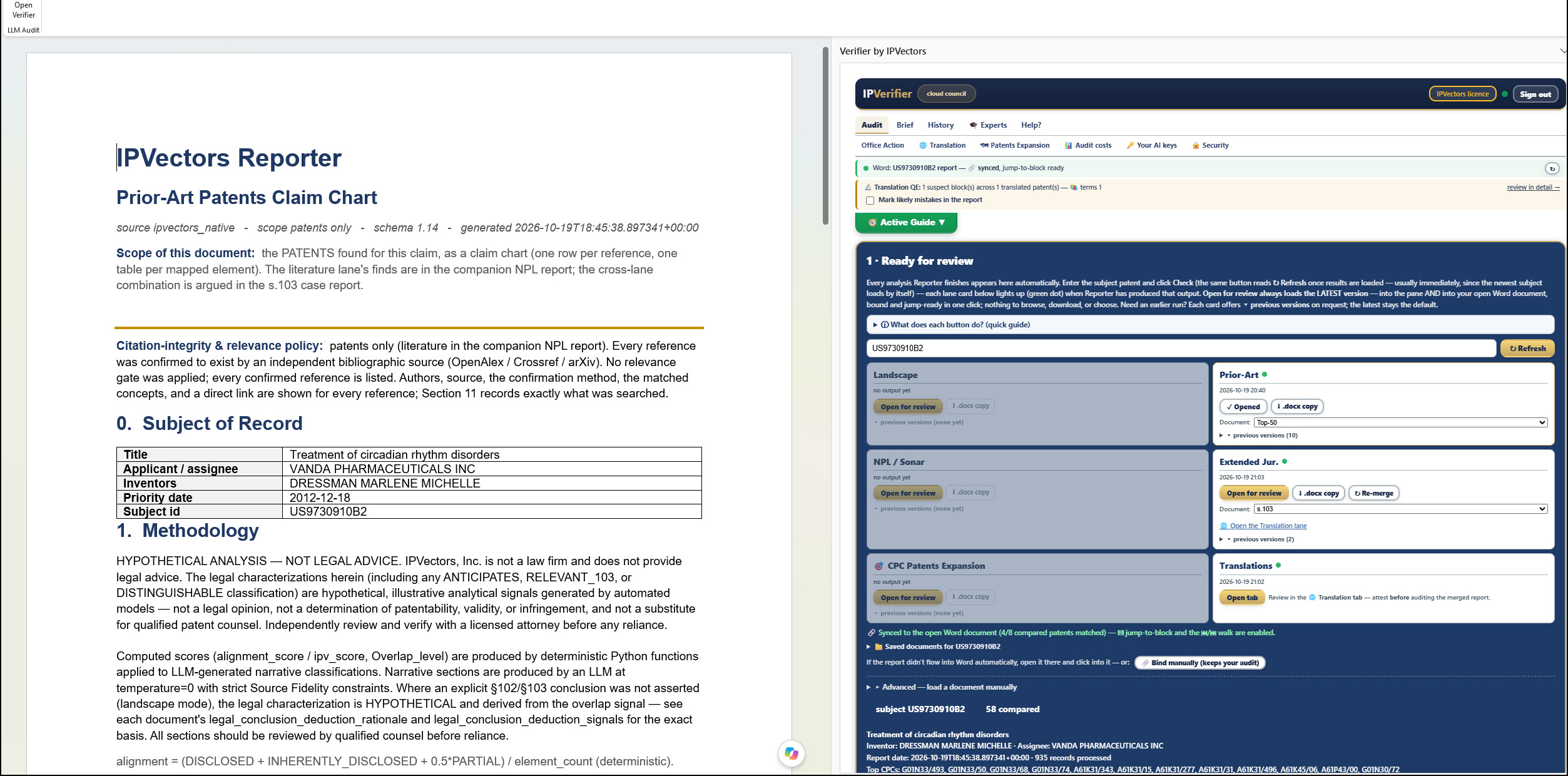
Word with the US9730910B2 prior-art claim chart open on the left, and the IPVerifier pane on the right showing the Ready for review cards: Prior-Art, Extended Jurisdictions and Translations lit for 2026-10-19, with the status bar reading synced, jump-to-block ready.

Next: Council in session — scene 2 of 5↓
The council

No model grades its own work.

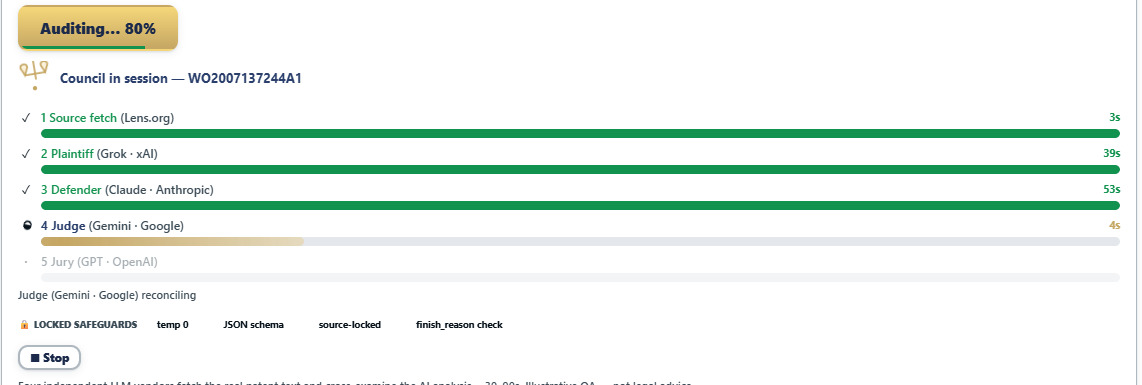
Source text is fetched first. Then one model argues the finding is supported, a second argues it is not, a third judges, and a fourth vendor gives a second opinion. Each runs against the source text at temperature zero, and each reports its own elapsed time.

1 · Source fetch

Lens.org

The real patent text, fetched before any model speaks. The council reads the document, not a summary of it.

2 · Plaintiff

Grok · xAI

Argues the finding is not supported by the source.

3 · Defender

Claude · Anthropic

Argues that it is.

4 · Judge

Gemini · Google

Reconciles the two against the text and grades each statement green, amber or red.

5 · Jury

GPT · OpenAI

An independent review from a fourth vendor that took no part in the argument.

2

Council in session

Scene 2 of 5

WO2007137244A1, seven sections, focused on the evidence. Thirty to ninety seconds.
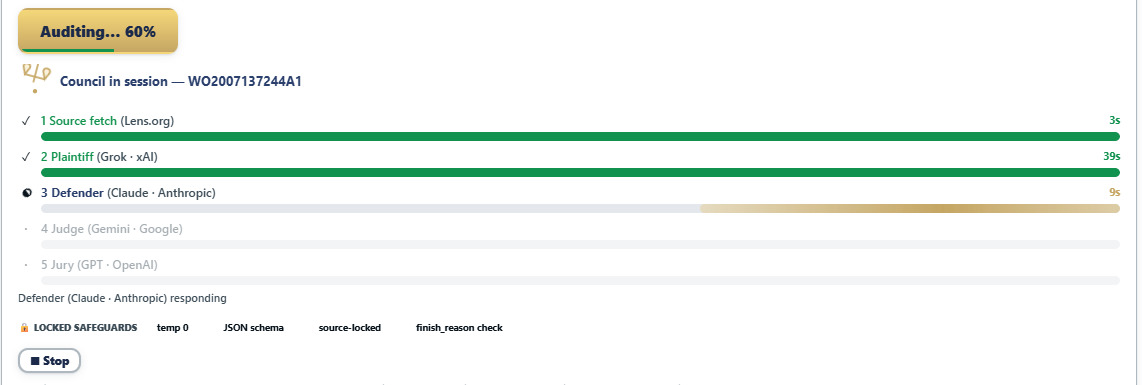
Council in session for WO2007137244A1 at 60 percent: source fetch done in 3 seconds, Plaintiff Grok done in 39 seconds, Defender Claude responding, Judge Gemini and Jury GPT waiting. A locked-safeguards strip reads temp 0, JSON schema, source-locked, finish reason check. The same council at 80 percent: Defender Claude done in 53 seconds, Judge Gemini reconciling, Jury GPT waiting.

Next: What the council found — scene 3 of 5↓
The verdict

The council is allowed to lose.

On one recorded public sample the verdict came back do not ship, because the analysis had built an argument the source would not carry. That outcome is the point of running it: a review that can only agree is not a review. On this run it came back verified with caveats — and the caveats are the interesting part.

audit score 88%model agreement 63%8 green4 amber0 red
3

What the council found

Scene 3 of 5

Every statement in the analysis, graded against the text it cites — with the argument on both sides kept.
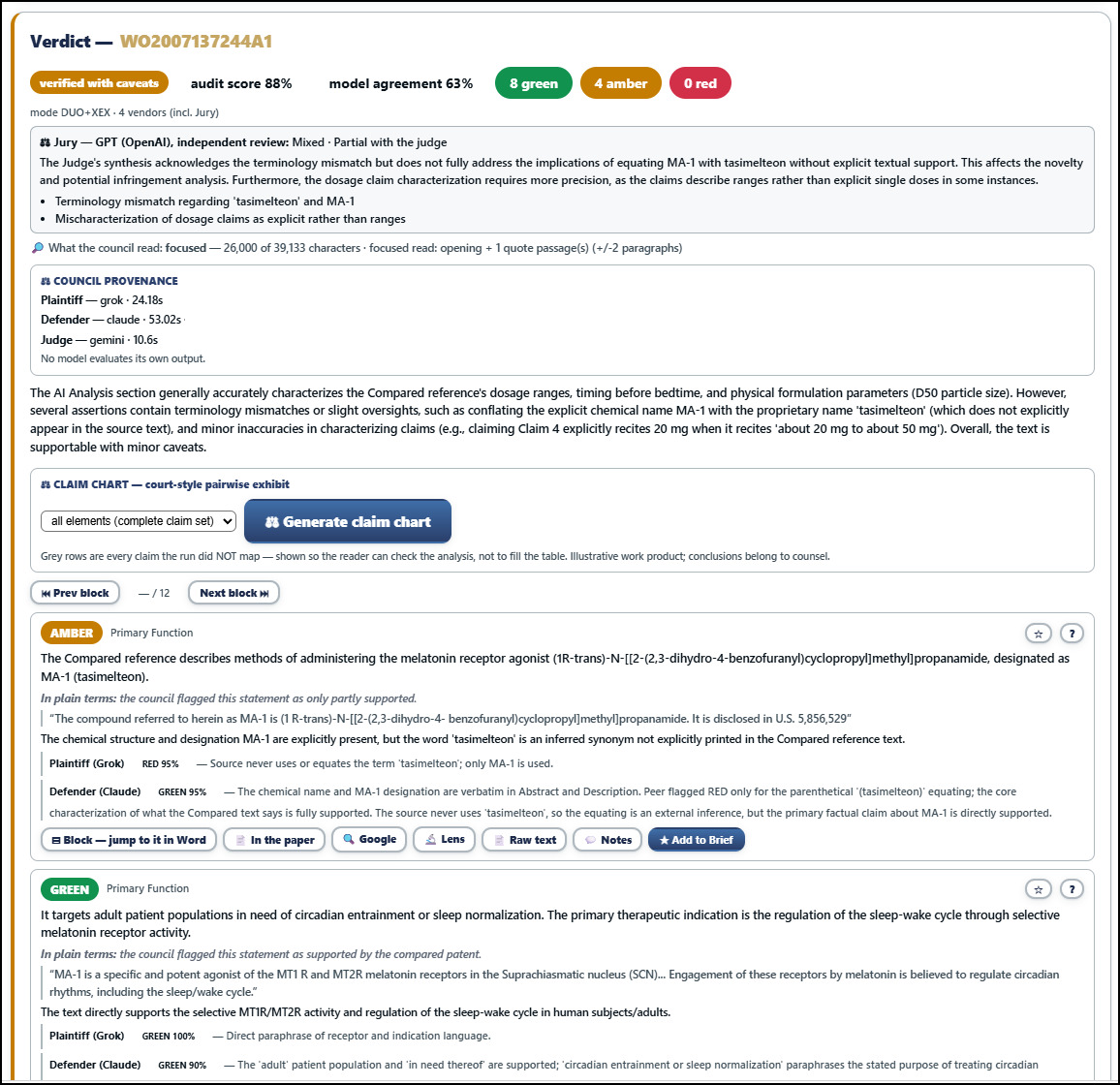
Verdict for WO2007137244A1: verified with caveats, audit score 88 percent, model agreement 63 percent, 8 green, 4 amber, 0 red. The Jury's independent review reads mixed, partial with the Judge. Council provenance lists Plaintiff Grok 24 seconds, Defender Claude 53 seconds, Judge Gemini 10.6 seconds. An amber finding on Primary Function: the analysis wrote MA-1 (tasimelteon) but the source never uses the word tasimelteon.

Next: Jump to it in Word — scene 4 of 5↓
4

Jump to it in Word

Scene 4 of 5

Every finding is one click from its sentence in the document.
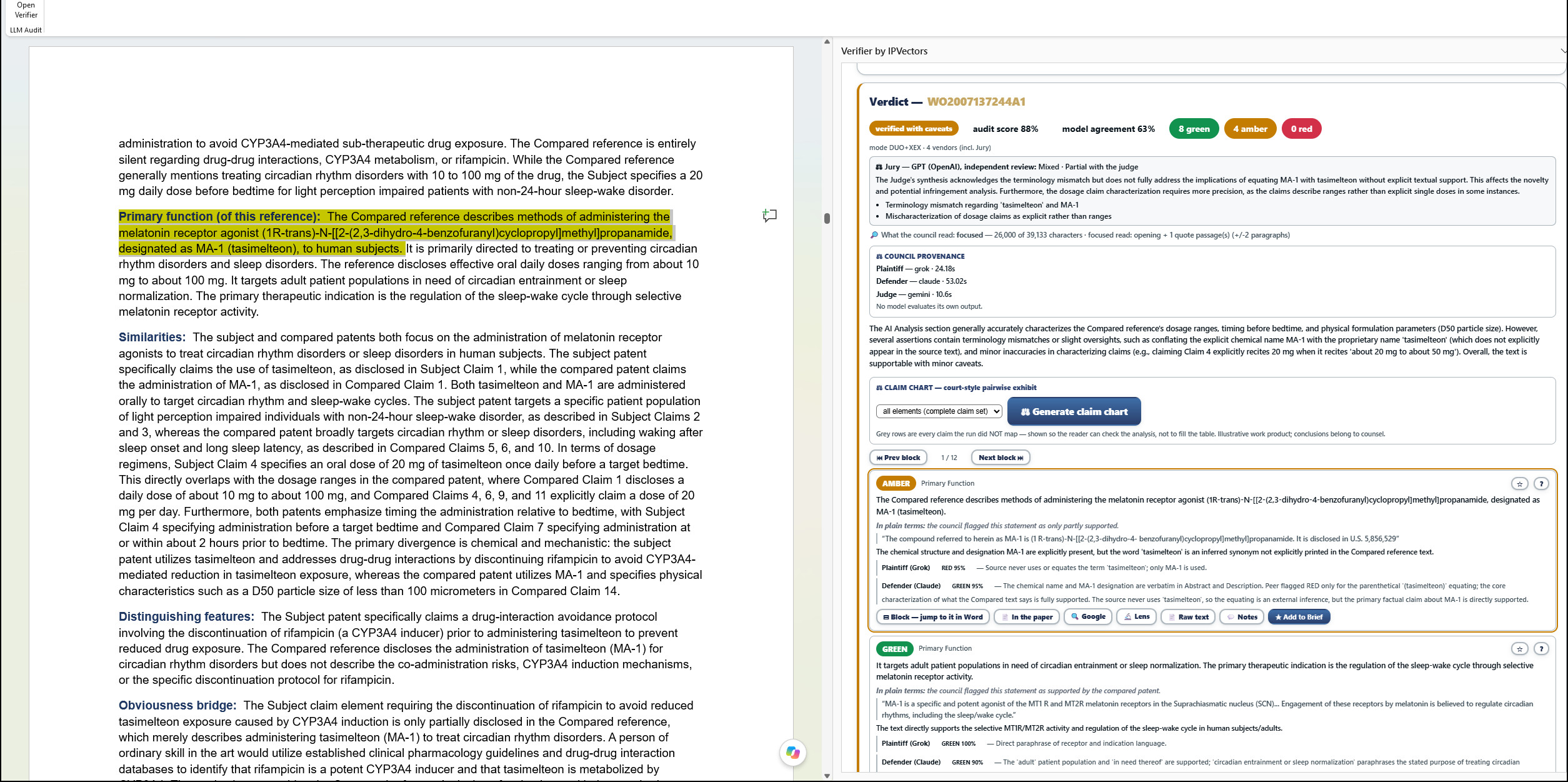
After clicking Block, jump to it in Word: the Primary function sentence in the Word report is highlighted in yellow on the left, while the amber verdict card for the same sentence is visible in the pane on the right.

Next: A Chinese patent, block by block — scene 5 of 5↓
Translation

Searchable is not the same as citable.

A raw machine translation of a foreign patent is searchable but not citable. In IPVerifier a translation can be audited for errors, reviewed block by block against the original script, and signed off by your own expert before it carries any weight. The original text sits in Word; the review sits in the pane; each block in one is linked to its counterpart in the other.

5

A Chinese patent, block by block

Scene 5 of 5

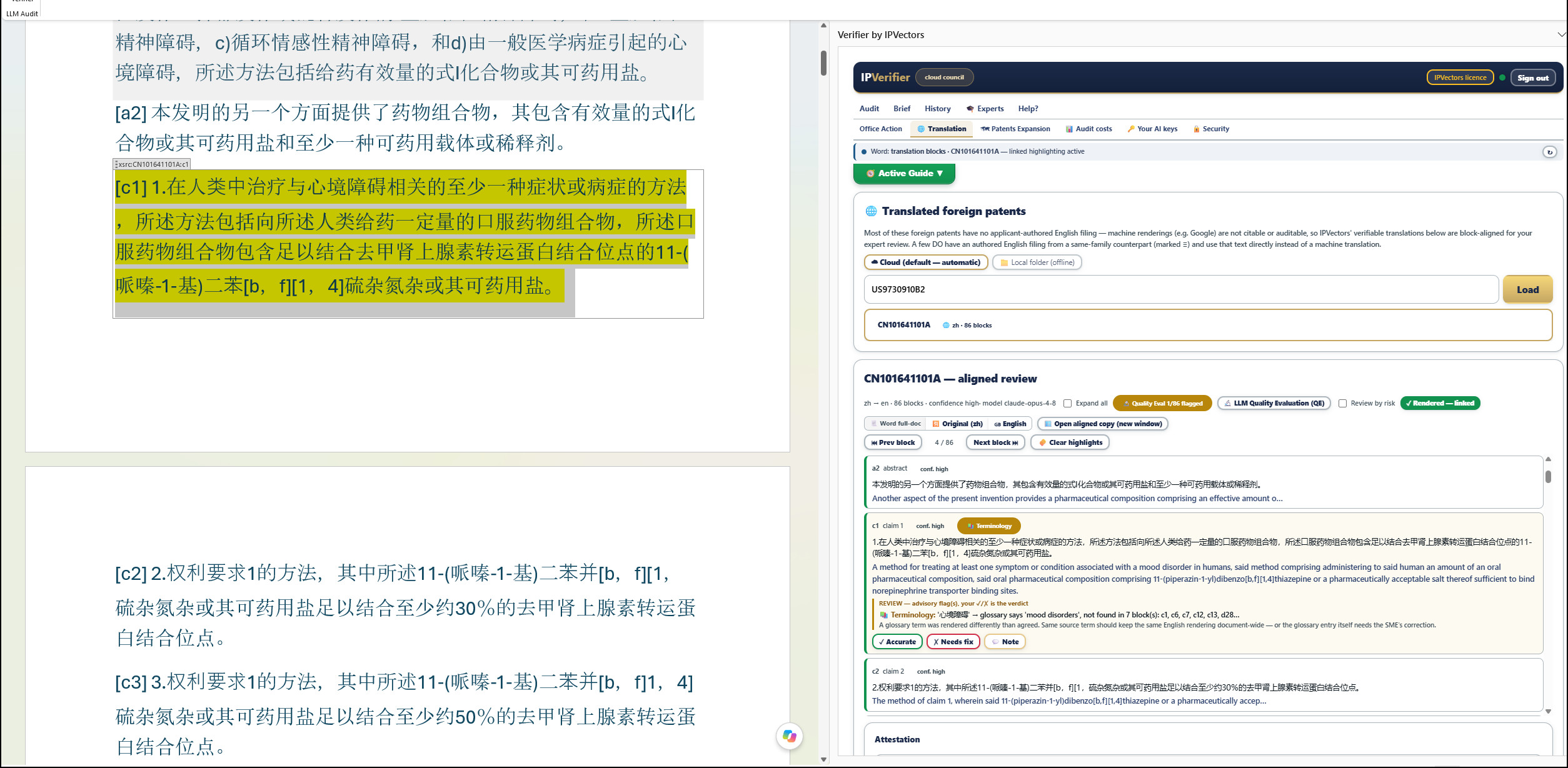
CN101641101A — the original script in Word, 86 aligned blocks in the pane, linked.
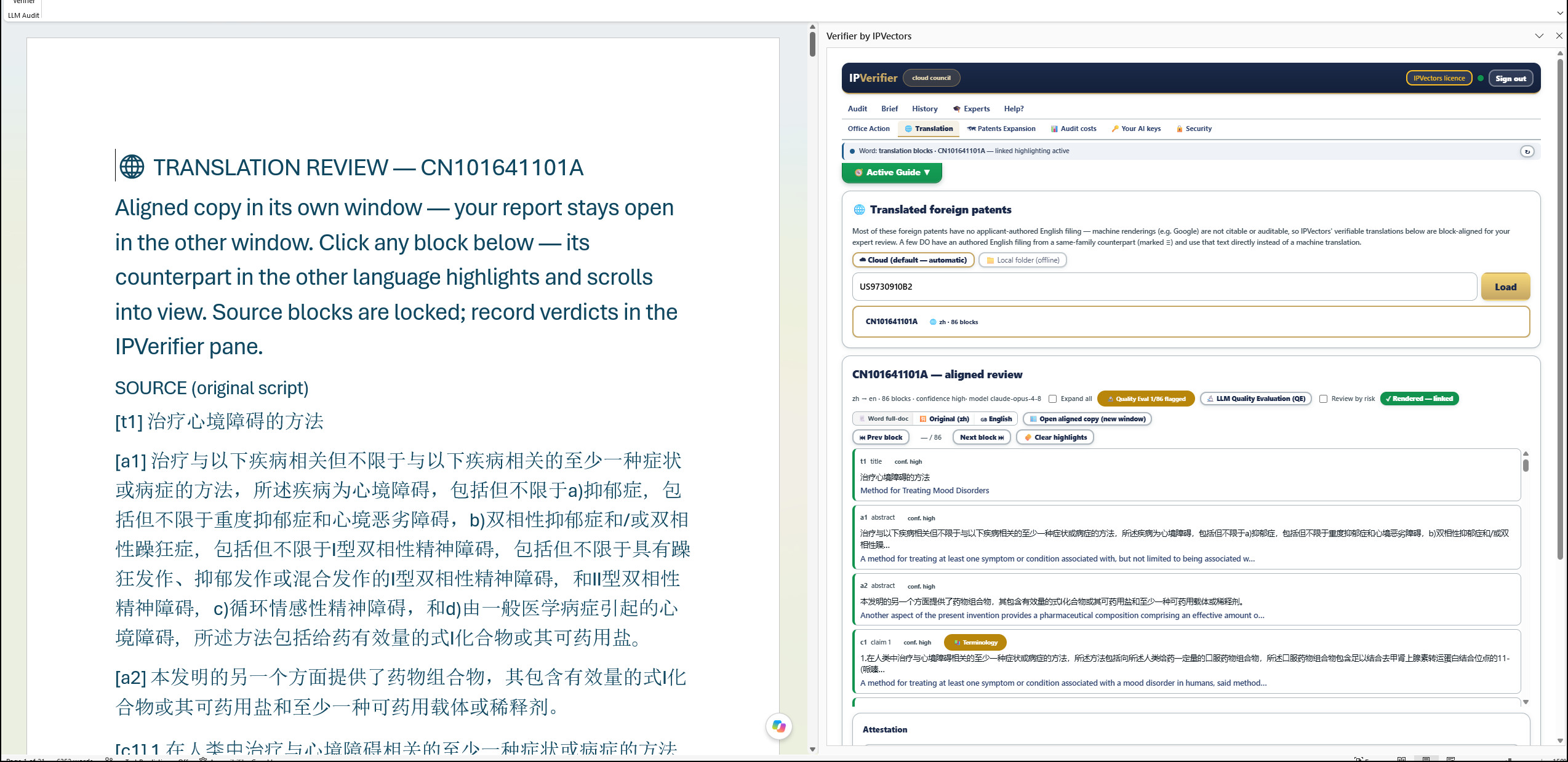
Word showing the Chinese source text of CN101641101A, each block tagged, beside the IPVerifier Translation tab showing the same patent with 86 aligned blocks, confidence high, Quality Eval 1 of 86 flagged, and a badge reading Rendered, linked. After clicking claim 1 in the pane, the Chinese text of claim 1 is highlighted in Word; the pane shows block c1 expanded with source and English, a terminology advisory, and Accurate, Needs fix and Note buttons.

Continue: The seal — a file that proves its own history↓
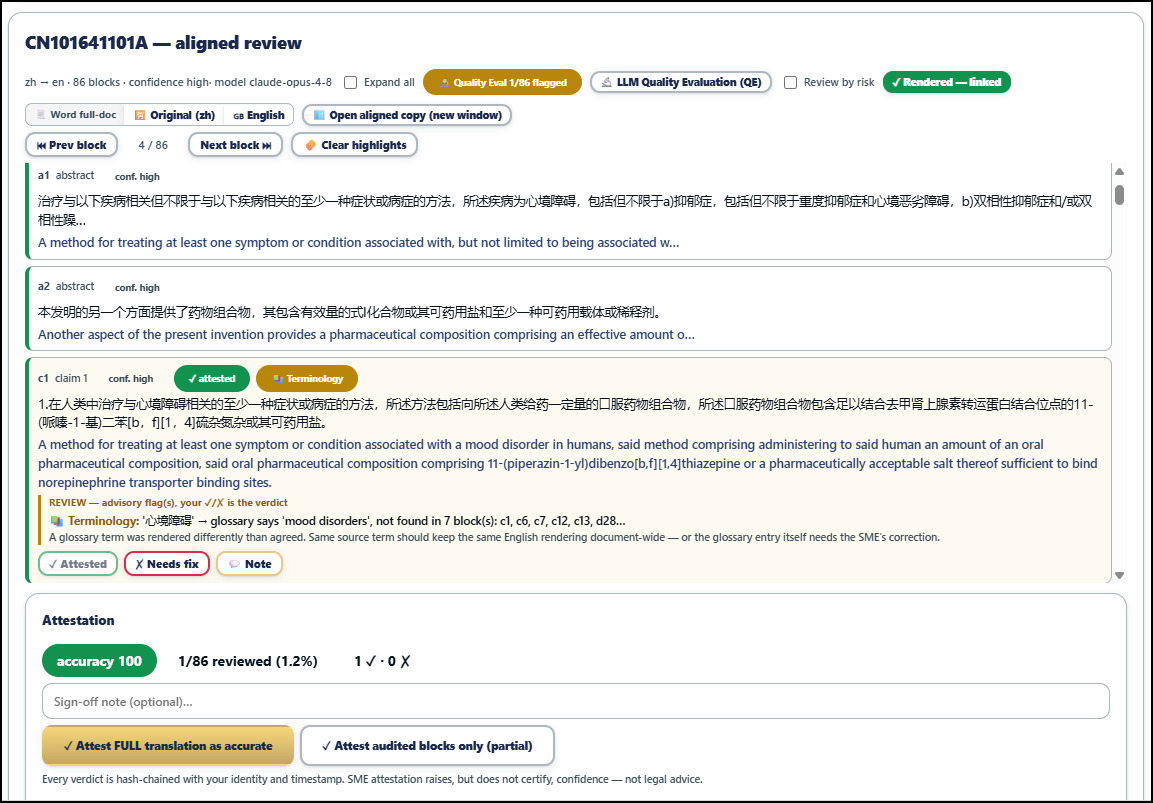
The attestation panel: block c1 marked attested, 1 of 86 reviewed, accuracy 100, with buttons to attest the full translation as accurate or only the audited blocks.
Attestation. Every verdict is hash-chained with your identity and timestamp. SME attestation raises, but does not certify, confidence — not legal advice.
The seal

A file that proves its own history.

The findings you keep become one self-contained PDF, signed by the IPVectors™ Attestation Service, countersigned with an independent RFC 3161 trusted timestamp, and hashed into a tamper-evident chain. Open it in Adobe Reader and the Signature Panel shows the signer, the trusted time, and whether a single byte has changed since.

The timestamp authority is independent of IPVectors, which is the whole point. Our word is not what makes the file verifiable.
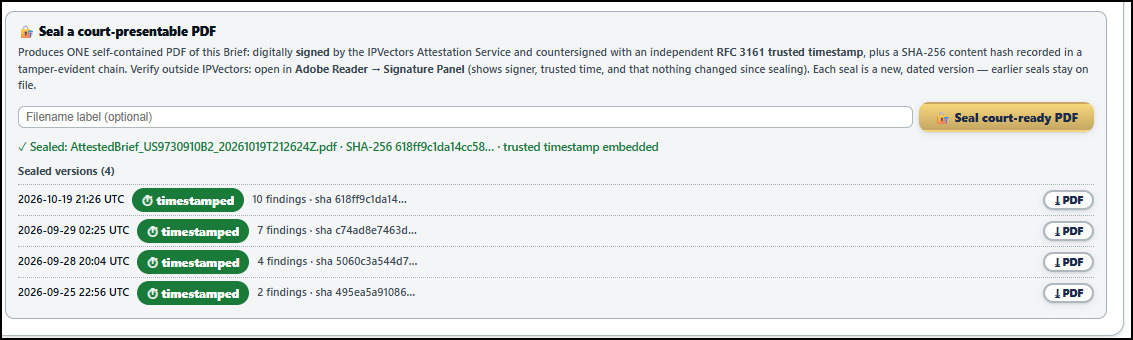
The Brief's seal panel: a sealed court-ready PDF with SHA-256 hash and trusted timestamp embedded, and a list of four sealed versions, each timestamped, with the number of findings and hash for each.
Sealed versions. Each seal is a new, dated version; earlier seals stay on file. The entry at the top is this session's — ten findings, trusted timestamp embedded.
Your keys, your terms

Roles are assigned per run, under your own keys.

One model, asked a hard question, is confidently wrong in ways its own output will not reveal. IPVerifier puts four models from four vendors on the same question and lets them cross-examine each other. Agreement across independently trained models is evidence. Disagreement is a flag — and it is recorded, not averaged away.

Keys are stored on your computer only, encrypted before they are sent, never in our database and never in our logs. On your own keys your contract with each vendor governs; the Security tab shows what each vendor commits to, and when it was last checked.
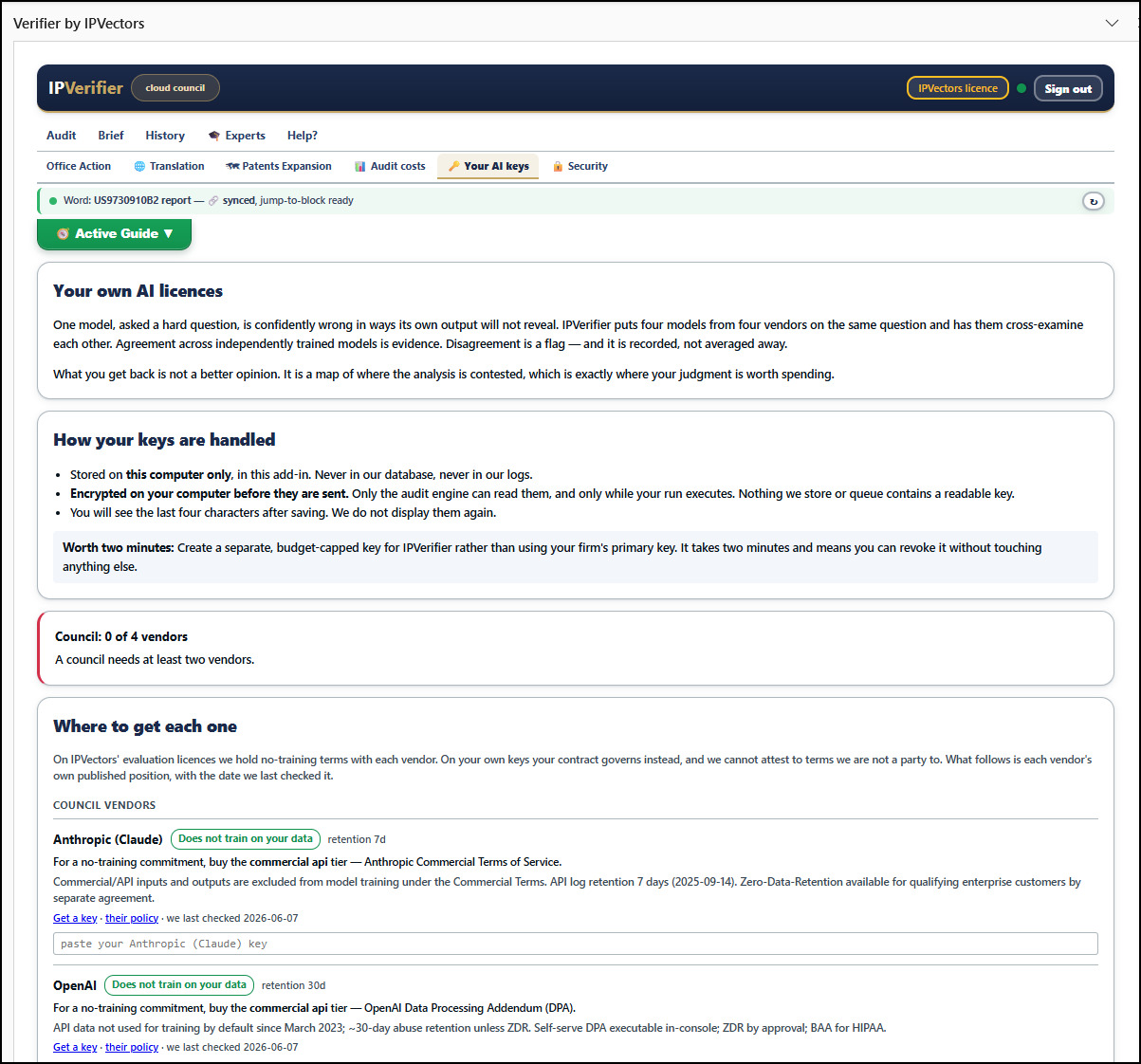
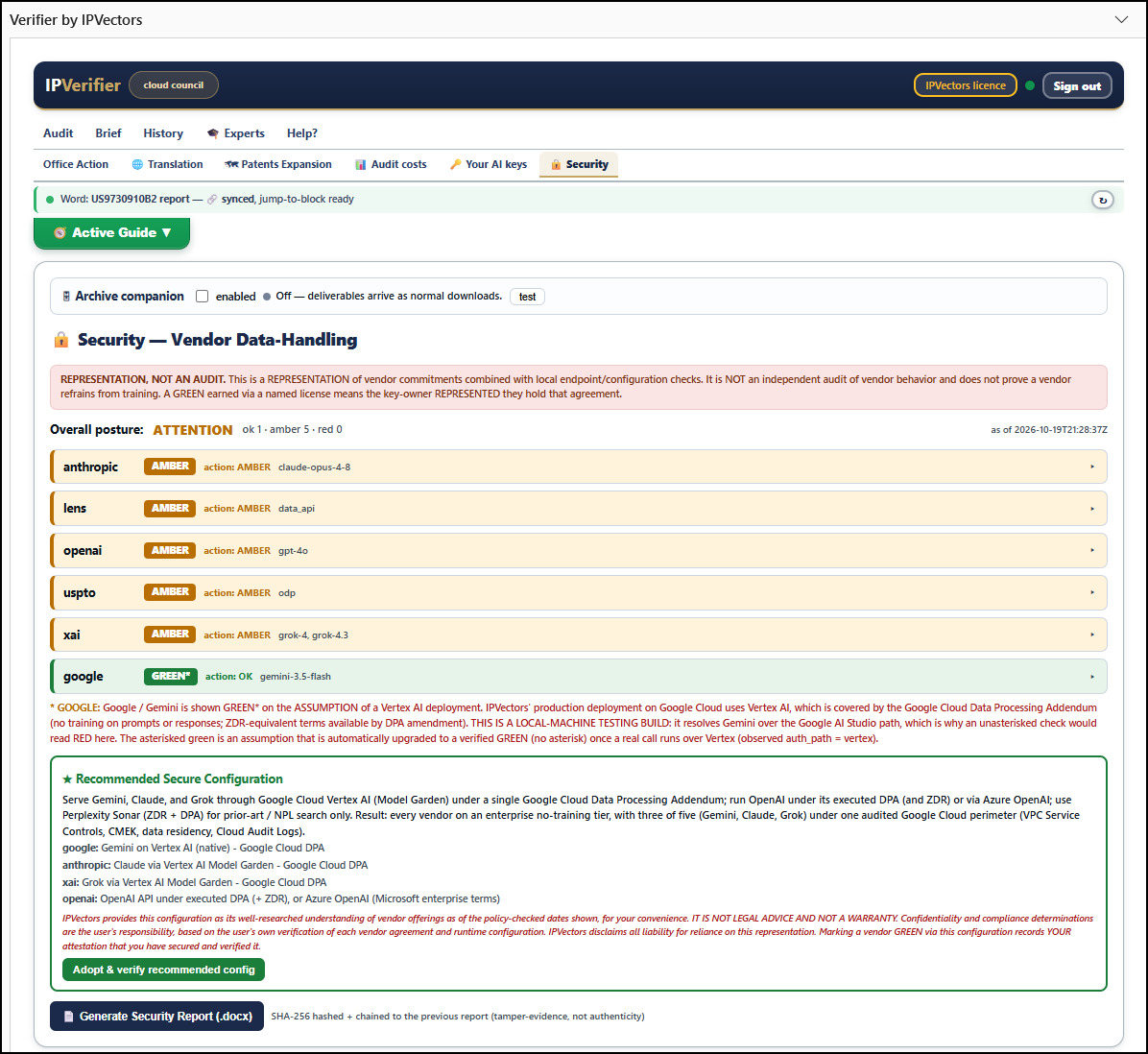
The Your AI keys tab: how your keys are handled, and a vendor list with each vendor's training-data commitment and retention period.
Your AI keys. Stored on this computer only. You will see the last four characters after saving.
The Security tab: vendor data-handling posture for each vendor, an overall posture of attention, and a recommended secure configuration via Google Cloud Vertex AI and Azure OpenAI with a one-click adopt button.
Security. A representation of vendor commitments, checked locally — not an audit of vendor behaviour. The recommended configuration is one click.